
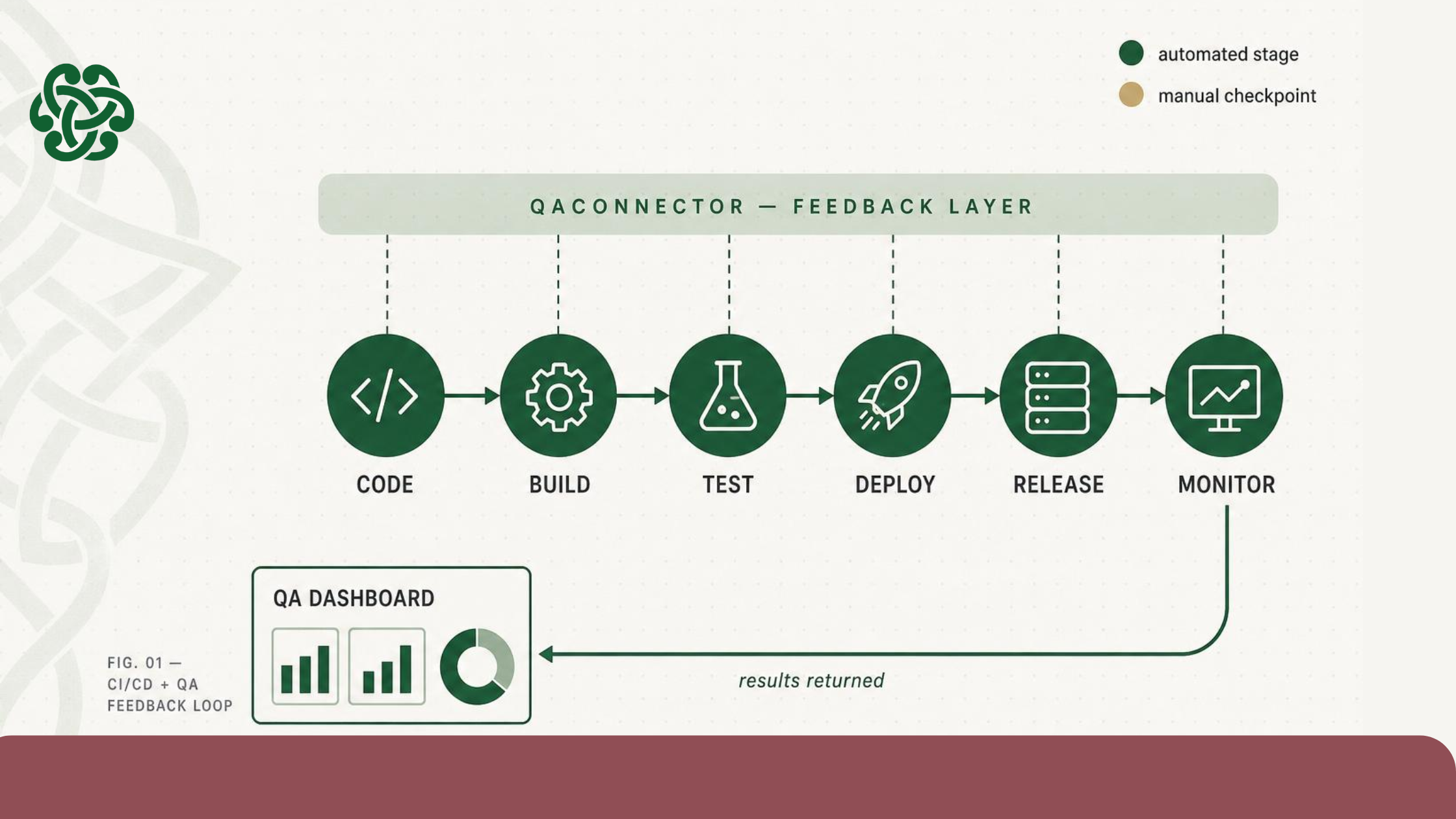
Slow QA feedback is a CI/CD problem most teams have learned to live with — but don’t have to. QAConnector’s Test Stack Integration connects directly to Jenkins, Azure DevOps, Bamboo, and other CI/CD tools, pushing test results back to your QA dashboard in real time so your team sees failures the moment a build completes, not hours later.
Why CI/CD pipelines leave QA teams waiting
Most QA teams running CI/CD pipelines hit the same wall: builds complete, automation runs, but the results live in a separate system that someone has to manually check, extract, and import into a test management tool. By the time a QA manager sees what failed, the development team has already moved on to the next ticket.
This isn’t a people problem. It’s a toolchain problem. CI/CD pipelines were built to automate build and deploy — not to close the feedback loop back to the QA layer. Test results get stranded at the pipeline boundary.
The practical cost: defects that get caught late, regression failures that get reopened, and sprint reviews where nobody can confidently say what was actually tested against this build. [VERIFY: cite a DORA report stat on mean time to restore or defect detection cost at later stages — search dora.dev for current metrics.]
What “automated QA feedback” actually means
Automated QA feedback is the practice of having test execution results — pass/fail status, defect data, coverage metrics — returned automatically to your test management platform as part of the CI/CD pipeline run, without a manual handoff step.
This is different from “automated testing” (which most teams already have). The gap isn’t whether tests run automatically — it’s whether the results come back to the right place automatically, in real time, and in a form the whole team can act on.
When the feedback loop is closed, QA managers see failures as they happen. Developers get actionable data before they context-switch. CIOs see release risk on a dashboard, not in a meeting.
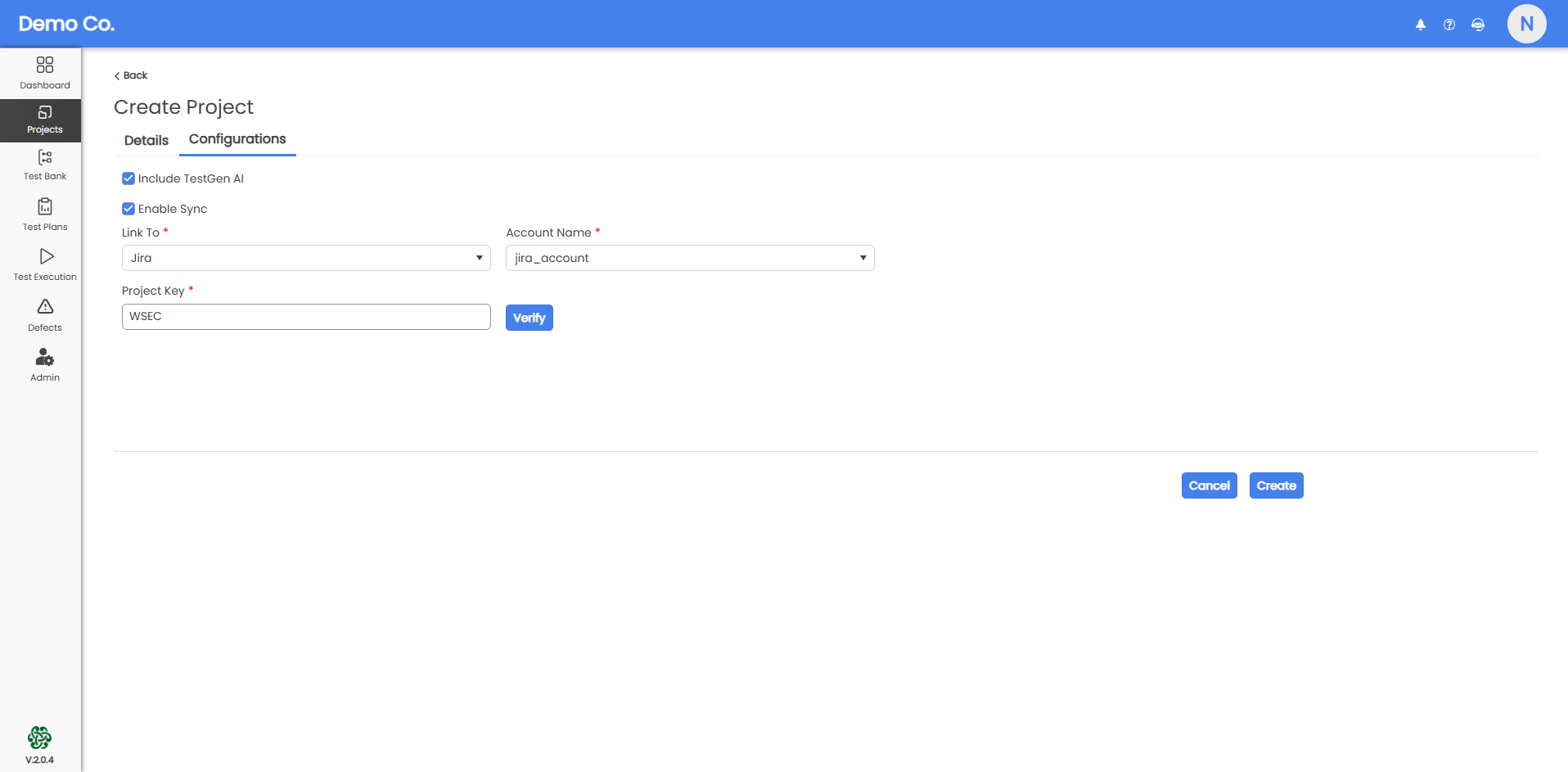
Once the integration is live, your pipeline runs produce QA records automatically. No CSV exports. No manual imports. No “did we test that?” in the sprint review.
Ready to see how it looks in your stack? Schedule a demo and we’ll walk through the integration live.
Real-time visibility during every build
With the feedback loop closed, Real-Time Reporting in QAConnector gives the whole team — QA engineers, developers, product owners, and stakeholders — a live view of what is passing, what is failing, and where coverage has gaps.
This is not a dashboard that refreshes once a day. It is a live feed that updates as each build runs.
For QA managers, that means no more chasing developers for build logs or manually correlating test results to a release. For product owners, it means release readiness is visible without asking anyone. For developers, it means failing tests surface in their workflow before they have closed their IDE.
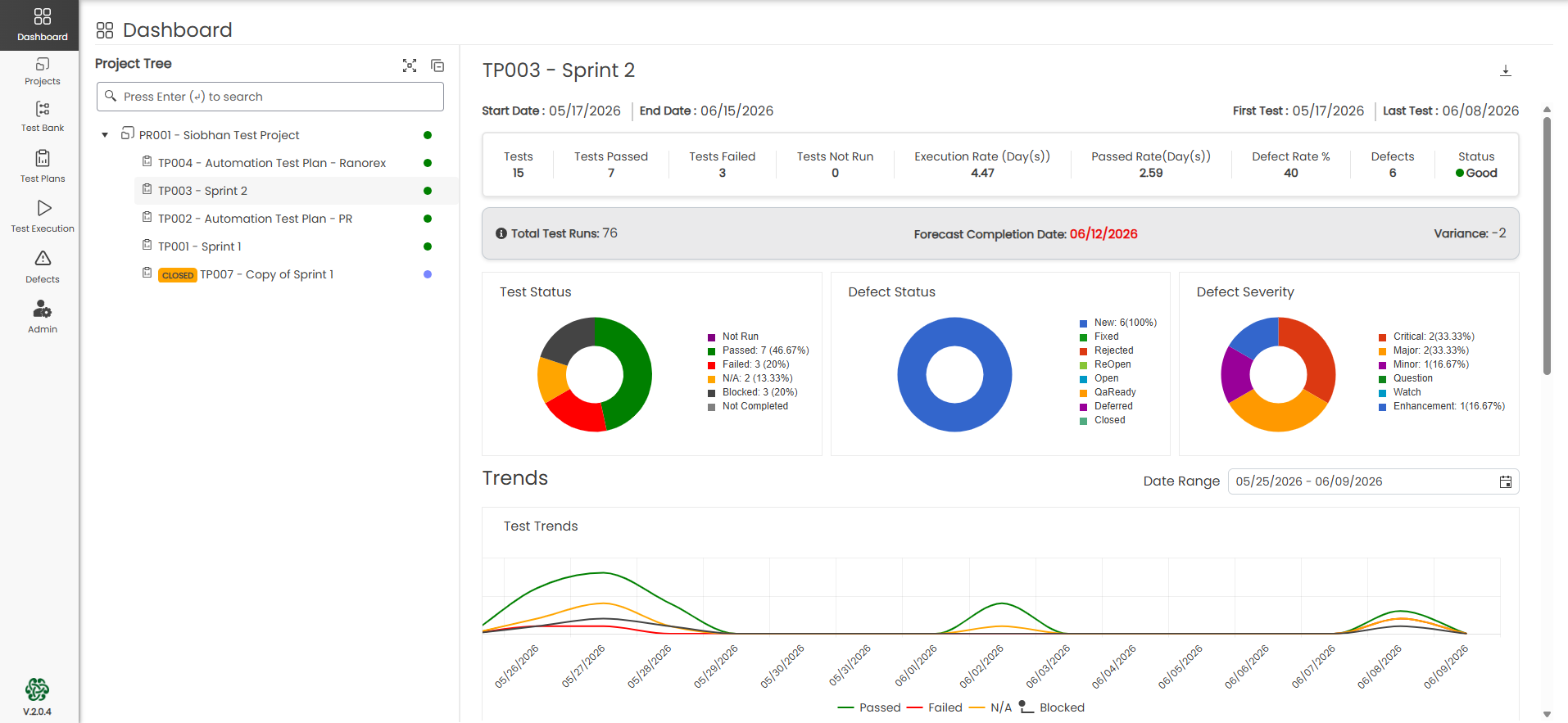
Want to see how your team’s test coverage looks in real time? Explore Real-Time Reporting in QAConnector.
Keeping test coverage current with TestGen AI
Fast pipelines put pressure on test coverage. When deployments happen daily — or more — test suites can fall behind new features, leaving gaps that a connected pipeline will expose but not fill.
TestGen AI in QAConnector addresses this directly. Upload a requirement document, paste a prompt, or import from Jira — TestGen AI generates positive and negative test cases in minutes, not days. When your pipeline is running multiple times a day, having a test generation workflow that keeps pace is the difference between meaningful coverage metrics and a dashboard full of empty test cycles.
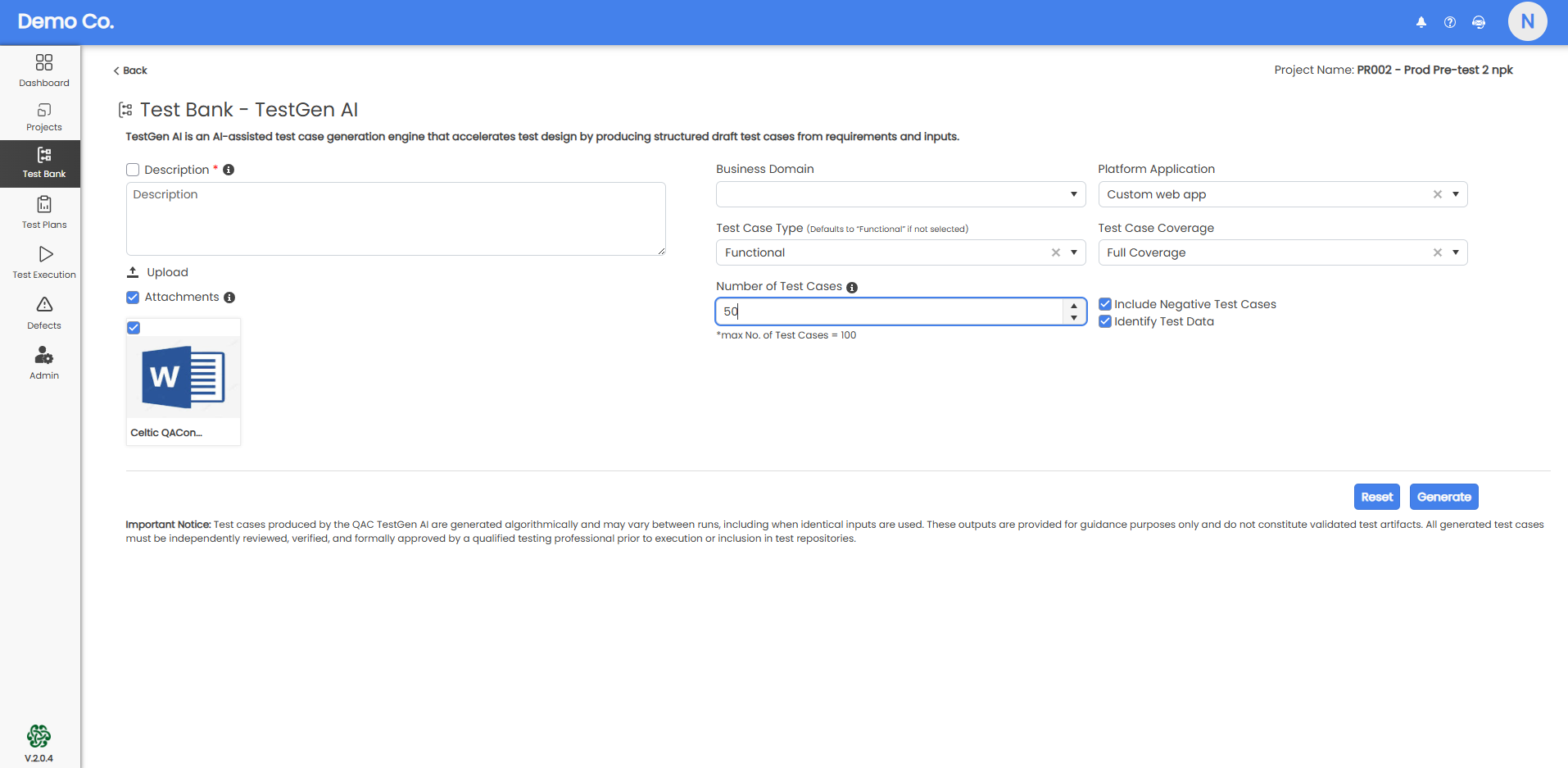
For teams that previously waited on QA engineers or SMEs to author test cases before a sprint cycle could begin, this removes the upstream bottleneck. Test coverage grows with your product, not behind it.
Audit-proof records without the manual overhead
For QA teams in regulated industries — financial services, healthcare, SaaS with enterprise compliance requirements — a fast CI/CD pipeline that does not leave an auditable record is a risk, not a benefit.
QAConnector’s Audit-Proof QA means every build result that flows through the Test Stack Integration is automatically logged: which test cases ran, which passed or failed, which requirements they were mapped to, and when. Version history is maintained. Role-based access controls who can view and act on results.
For a CTO or CIO presenting to an auditor: the question “what was tested before this release?” has a structured, timestamped, exportable answer — without asking QA to produce it manually the night before the audit.
QAConnector is built on Microsoft Azure — enterprise-grade security, reliability, and compliance infrastructure is part of the foundation, not an add-on.
Audit readiness starts with the right platform. Schedule a demo to see how QAConnector handles compliance documentation.
FQAs
Q: What is automated QA feedback in a CI/CD pipeline? A: Automated QA feedback is the automatic return of test execution results — pass/fail status, defect data, coverage metrics — to your test management platform as part of a CI/CD pipeline run. It eliminates manual handoffs between pipeline outputs and QA records, giving the full team visibility immediately after a build completes.
Q: How does QAConnector integrate with CI/CD tools like Jenkins or Azure DevOps? A: QAConnector’s Test Stack Integration connects to Jenkins, Azure DevOps, Bamboo, and other CI/CD runners. After initial configuration, every pipeline build pushes results directly to QAConnector’s Real-Time Reporting dashboard — no manual imports required. Setup typically takes one configuration session. [VERIFY: confirm supported integrations list in current product docs.]
Q: What is the difference between automated testing and automated QA feedback? A: Automated testing means your tests run without manual execution. Automated QA feedback means the results of those tests return automatically to the right QA management system, in real time, without a manual step. Most teams have the first but not the second — and that gap is where defects get discovered late.
Q: Can QAConnector keep up with frequent CI/CD deployments? A: Yes. QAConnector is designed for high-frequency delivery environments. Real-Time Reporting updates as each build runs, and TestGen AI ensures test coverage can grow at the same pace as deployments — generating test cases from requirements in minutes rather than days.
Q: Does connecting QAConnector to CI/CD help with audit and compliance requirements? A: It does. Every build result pushed through QAConnector’s Test Stack Integration is automatically logged with full traceability — test cases, results, requirements mapped, timestamps, and access history. For teams subject to SOX, NIST, or ISO review, this structured audit trail is generated automatically rather than assembled manually before each audit.
The gap between “our pipeline is automated” and “our QA feedback is automated” is where most teams lose time — and where most release risk hides. Connecting QAConnector to your CI/CD stack closes that gap: results come back in real time, coverage grows with TestGen AI, and every build leaves an audit-ready record.
Recent Comments