
QAConnector integrates natively with Jira to close the traceability gap QA teams hit when using Jira alone. It connects requirements, test cases, execution results, and defects into a single traceable thread — with Real-Time Reporting that shows live coverage against Jira stories and TestGen AI that generates test cases from requirements in minutes.
Why Jira Alone Leaves a Traceability Gap
Jira is excellent at what it does. Issue tracking, sprint planning, backlog grooming — it is the backbone of most engineering workflows, and for good reason. The problem is what happens on the QA side.
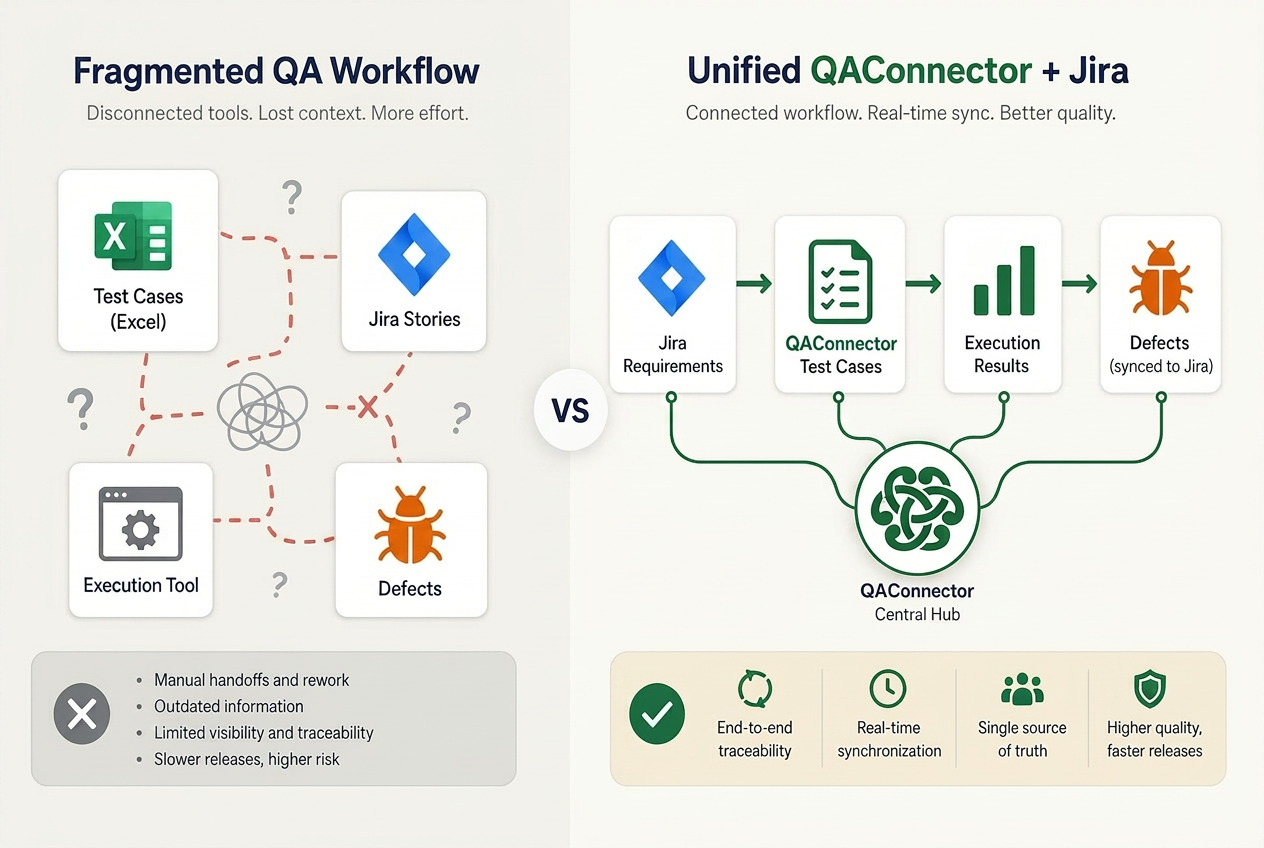
Most teams using Jira for development end up with something like this: requirements sit in Confluence or Jira stories, test cases live in a spreadsheet or a separate tool, execution results get logged in yet another place, and defects flow back into Jira. At sprint close, someone manually correlates all of it and produces a coverage report that is, by the time it arrives in the retrospective, already stale.
Explore the full QAConnector feature set →
This is the Jira traceability gap: not a failing of Jira, but a structural consequence of asking an issue-tracking platform to carry the weight of QA management. Jira connects issues. It does not connect requirements to test cases to execution results to defects in a single, auditable chain. That is a different job — and it is the job QAConnector was built to do.
What End-to-End QA Traceability Actually Looks Like
Before jumping into best practices, it helps to agree on what traceability means.
QA traceability is the ability to follow a requirement from its origin through test design, test execution, and defect resolution — so every requirement is validated, every test is accounted for, and every issue is linked back to its source.
That chain looks like this:
- Requirement — a user story, acceptance criterion, or system requirement.
- Test case — one or more test cases mapped to that requirement (positive and negative paths).
- Test execution — a logged run of the test case with a pass/fail result.
- Defect — any failure linked to the test case and the originating requirement.
- Resolution — the defect fix confirmed by a re-run of the associated test case.
Without this chain, coverage percentage is a number without a story. “87% of test cases passed” tells you almost nothing if you don’t know which requirements those test cases covered.
A requirements traceability matrix (RTM) makes this chain visible: every requirement on one axis, every test case on the other, execution status and defect counts in the cells. The RTM is also what auditors ask for. Building it manually — in Excel, or worse, by exporting Jira data into a spreadsheet — is the kind of work that takes two days before a compliance review and is out of date the moment it’s saved.
How QAConnector Integrates With Jira
QAConnector sits alongside Jira as the QA management layer. Jira stays the issue backbone; QAConnector adds the test planning, execution, and traceability infrastructure on top.
Here is what that looks like in practice:
|
Capability |
Jira Alone |
Jira + QAConnector |
|
Requirements / user stories |
✓ Native |
Imported into QAConnector as requirements |
|
Test case creation |
Workaround (custom issue types or plugin) |
Native, with TestGen AI generation |
|
Test execution tracking |
Not native |
Full execution log with pass/fail/blocked per run |
|
Requirements traceability matrix |
Manual spreadsheet |
Auto-generated, live, filterable |
|
Defect linkage |
Native (defect issues in Jira) |
Bi-directional sync: QAConnector defect ↔ Jira issue |
|
Coverage reporting |
Manual export + assembly |
Real-Time Reporting dashboard |
|
Audit package |
Manual assembly |
Structured, timestamped, role-gated export |
The integration is bi-directional. Jira stories import into QAConnector as requirements — no re-entry. Defects logged in QAConnector sync automatically back to Jira as issues, so developers see them in the tool they already use. And Real-Time Reporting in QAConnector maps execution status directly to the Jira sprint, giving QA managers live coverage data without leaving their QA management view.
TestGen AI adds another layer: import a Jira user story, prompt TestGen AI with the acceptance criteria, and it generates positive and negative test cases in minutes. This eliminates the manual test-authoring bottleneck that typically pushes test case creation to the end of the sprint — where it belongs at the beginning.
Best Practices for Traceability and Workflow Alignment
Here are five practices that QA teams using Jira + QAConnector should lock in from day one.
- Import Jira stories as requirements — don’t mirror them manually.
The most common setup mistake is maintaining a separate requirements list in QAConnector that someone updates to match Jira. Use the integration to import Jira stories directly as requirements. Any update to the Jira story propagates. Traceability is only as reliable as the underlying data source.
- Use TestGen AI to generate test cases at requirement intake — not sprint close.
Most teams write test cases at the end of the sprint, when there is no time to run them properly. With TestGen AI, test cases can be generated at the same time requirements are imported — within the first day of a sprint. That moves test design into the planning phase, where it can surface ambiguous requirements before a line of code is written.
- Link every test execution result to its originating Jira story.
When a test fails, log the defect in QAConnector and let the Jira sync create the issue automatically. When a test passes, the traceability matrix updates immediately. This one practice alone eliminates the sprint-close scramble of correlating execution results with requirements.
- Use the traceability matrix view to find untested requirements before sprint close.
The RTM in QAConnector filters requirements by coverage status — tested, untested, partially covered, blocked by a defect. Run this view two days before sprint close, not on the last day. Any untested requirement that surfaces two days out can still be addressed; one that surfaces the morning of the release review cannot.
- Export the coverage report for audit — and do it before you need it.
The Audit-Proof QA export in QAConnector produces a structured, timestamped coverage package with every test case, execution result, and defect linkage. Export it at the end of each sprint, not only when an audit is scheduled. The teams that show up to compliance reviews with six months of structured coverage history are the ones who have been exporting it all along.
What the CIO Needs to See — and QAConnector Delivers
For engineering leaders and compliance stakeholders, the question is not “how does the integration work” — it is “what can we prove, and to whom.”
QAConnector’s Audit-Proof QA framework produces complete, structured, tamper-proof records that demonstrate compliance with confidence. Every test executed, every defect logged, every requirement covered — with a timestamp and a user attribution. That is the evidence package that satisfies SOX testing requirements, maps to NIST controls, and supports ISO audit cycles.
And because QAConnector is built on Microsoft Azure, the infrastructure underneath it — encryption, access control, availability — meets the enterprise security and compliance posture that regulated industries require.
Release confidence, for a CIO, means being able to answer one question: “Do we know what we tested, what we found, and what we shipped?” Jira + QAConnector gives the entire organization — from QA engineer to Chief Information Officer — the same answer.
FAQ — Jira + QAConnector Traceability
How does QAConnector integrate with Jira? QAConnector connects bi-directionally with Jira: Jira stories import as requirements into QAConnector, and defects logged in QAConnector sync back to Jira automatically. Coverage data maps directly to Jira sprints, and Real-Time Reporting reflects execution status without manual export.
What is the difference between Jira test management and QAConnector? Jira handles issue tracking and project management. QAConnector adds test planning, AI-powered test case generation (TestGen AI), execution tracking, and automated traceability reporting. The two are complementary — QAConnector uses Jira as its issue backbone while extending it with full QA management capability.
Can QAConnector generate test cases from Jira user stories? Yes. TestGen AI generates positive and negative test cases from a Jira user story in minutes. Import the story as a requirement in QAConnector, provide the acceptance criteria as a prompt, and TestGen AI returns a structured test case set ready for review and execution.
What is a requirements traceability matrix and how does QAConnector build one? A requirements traceability matrix maps each requirement to its associated test cases and execution results, proving every requirement has been tested. QAConnector generates and maintains the RTM automatically as requirements are imported and test cases are executed — no manual spreadsheet work required.
How does Jira + QAConnector help with SOX or ISO audit readiness? QAConnector maintains a complete, structured, timestamped record of every test execution and defect linkage — traceable to the originating Jira requirement. Role-based access controls and Microsoft Azure’s compliance infrastructure provide the security posture. The result is an audit-ready evidence package without manual assembly.
What are the most common Jira QA traceability mistakes? Three patterns come up most often: using Jira labels to link tests to stories (breaks when stories are updated), tracking execution results in spreadsheets outside Jira (no single source of truth), and generating coverage reports manually at sprint close (hours of effort, data already stale). [VERIFY in SERP — confirm these surface as PAA results for primary keyword]
Make Every Jira Story Testable — and Traceable
Jira is the issue backbone. QAConnector is the QA management layer. Together, they give your team a complete traceability chain — from the moment a requirement is imported to the moment a test result closes it out — that holds up to any sprint review or any audit.
The five practices above are the starting point. The integration is live from day one. The traceability is automatic.
Schedule a QAConnector demo → and see the Jira integration in action.
Recent Comments